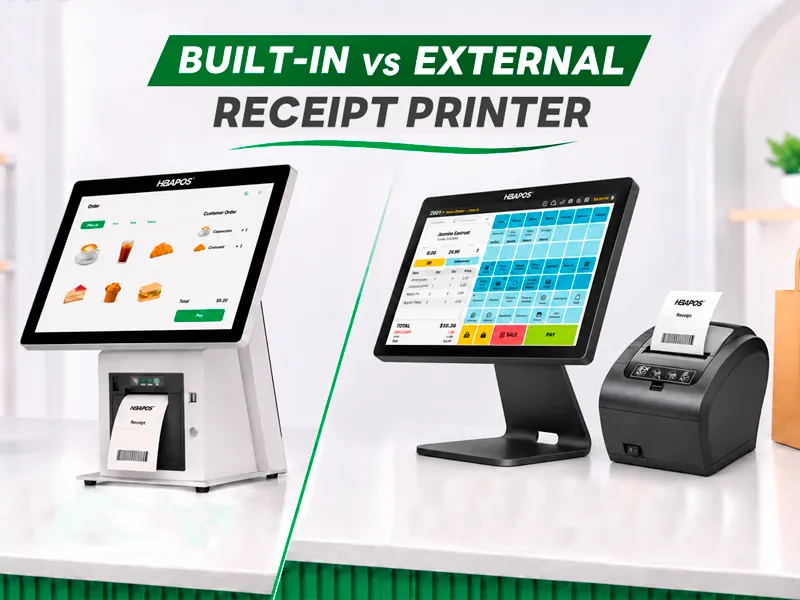
Where does the cashier hand over the receipt? If the customer pays and collects the receipt at the screen, a POS system with a built-in receipt printer keeps both tasks within reach. If the cashier finishes the sale at the screen and hands over a bag farther along the counter, an external printer can put the receipt where the bag changes hands.
When the receipt belongs at the screen

Picture a café counter with room for a terminal beside the card reader. The cashier takes the order, accepts payment and hands the customer a receipt from the same position. The
HBA-Q5 has a thermal receipt printer built into the front of its base. That leaves the counter beside the terminal available for the card reader or a customer’s order.
Try a roll change with the station set up as it would be during service. Leave the card reader, menu stand and any bags in their usual places. Can the cashier reach the paper compartment, open it fully and load a fresh roll without moving the terminal? The built-in layout works well when that space stays clear throughout the shift.
When the receipt belongs beside the bag
At a retail checkout, the screen may sit on one side of the scanner while purchases are bagged on the other. Pairing the
HBA-Q2 with an external
HBA-306 lets the screen face the cashier and the printer sit beside the bags. A cashier can slip the receipt into a bag without reaching back across the scanner. The same arrangement can suit a counter shared by a cashier and a colleague who packs purchases.
Before choosing that position, set a full shopping bag on the counter. Check whether it covers the paper outlet or blocks the printer cover. Trace the cable route to the proposed spot and allow room for the cashier to lift out an empty roll. If the store uses a cash drawer, its RJ11 cable plugs into the HBA-306 in this setup, or into the drawer port on the Q5 when using the built-in printer.
Choose the printer size and the paper you will stock
Printer size is an ordering decision. Roll width is also a day-to-day purchasing decision. A store that stocks 58 mm rolls can use them in either of the 80 mm printers below. That leaves the option of using wider paper later if the store changes its receipt layout.
The Q5’s 80 mm printer takes 58 mm rolls without a paper divider. The HBA-306 also accepts 58 mm and 80 mm thermal paper. If you already buy rolls for other stores, check the roll diameter as well as the width before placing a bulk paper order.
Let a printed receipt settle the paper choice
Use a receipt from your own POS software. Pick a sale with a long product name, a discount and a quantity greater than one. Print it at each width you are considering, using the corresponding receipt layout in the software. Check whether the customer can match each item to its price when a name wraps onto a second line. If you print a return barcode, scan it from the paper copy as a final check.
A short café receipt may read comfortably on 58 mm paper. An itemized retail receipt may benefit from the extra room on an 80 mm roll. Once you have a readable printout, specify both decisions on the order. For example, a store can order the Q5 with its standard 80 mm printer and stock 58 mm rolls from day one. A store that wants receipts beside the bagging area can specify the Q2 with a separate HBA-306 and choose paper to suit the same receipt test.